
Nate Hand Gesture
Launching Nate Hand Gesture
Preparing the browser build...
Nate Hand Gesture

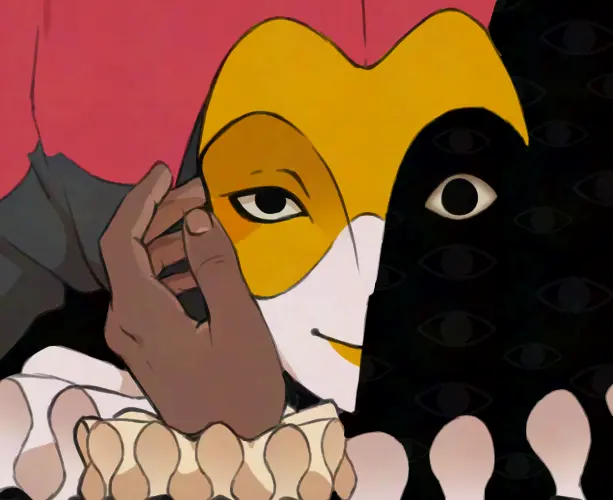


A hand game that watches you back
Nate Hand Gesture starts with rock-paper-scissors, a rule set simple enough to understand before the first round. Then Nate makes it clear that understanding the rules will not keep you safe. The story turns each hand into a social decision: winning may irritate her, losing may amuse her, and either result can pull the conversation somewhere worse.
That crooked setup gives Nate Hand Gesture its bite. The game does not bury the idea under a long tutorial or a maze of systems. You meet Nate, choose a response, put down a hand, and watch her mood shift. The route is short, but it makes every pause feel like the moment before somebody says the wrong thing.
This fan-made browser presentation is intended for adults and lets players launch Nate Hand Gesture online without downloading an installer. It is unofficial and contains threatening dialogue, unsettling imagery, mature themes, and references to death. Nate Hand Gesture works best when you enter with as little plot knowledge as possible, so this guide explains the rules and technical details without mapping every ending.
What is Nate Hand Gesture?
Nate Hand Gesture is a psychological horror visual novel about being forced into a hand game with an entity that consumes humans to experience their emotions. The premise sounds cosmic, yet the story keeps the danger close. Most of the tension lives in Nate’s face, her abrupt tone changes, and the suspicion that she already knows how each round will end.
The rock-paper-scissors mechanic gives Nate Hand Gesture a steady rhythm. Dialogue gives that rhythm meaning. A funny answer can calm the scene, while a sensible reply can land badly. The game keeps asking a better question than “Which symbol wins?”: what does the person across the table want from you right now?
The current Nate Hand Gesture route is deliberately compact. It includes one main path, several conclusions, and multiple fatal outcomes rather than a sprawling campaign. That scale suits Nate Hand Gesture because a finished run becomes evidence. You can remember where Nate’s expression changed, return, and test a different attitude without replaying hours of filler.
How to play Nate Hand Gesture online
To start Nate Hand Gesture, press Play now in the game panel above. The browser build loads only after that click, preventing surprise audio and keeping the page responsive. Once the game appears, click or tap inside the frame, advance the dialogue, choose responses, and select rock, paper, or scissors when the match asks for a hand.
The controls in Nate Hand Gesture are intentionally light. A mouse works on desktop, while direct taps handle the same choices on a phone or tablet. Use the expand control if the text feels cramped. The fullscreen button gives the scene more room, although iPhone and iPad browsers may handle embedded fullscreen differently from desktop Chrome, Edge, Firefox, or Safari.
There is no executable download required for this edition of Nate Hand Gesture. A first launch may take several seconds because the Unity WebGL files need to initialize. If the frame shows a black screen, wait before refreshing, confirm JavaScript is allowed, and check whether a privacy extension has blocked the separate game host.
Nate Hand Gesture rules, mood, and cheating
The visible rules in Nate Hand Gesture are familiar: rock beats scissors, scissors beats paper, and paper beats rock. The hidden rule is Nate herself. Nate Hand Gesture repeatedly suggests that her mood can influence whether a round is fair, so treating every choice as a clean probability problem misses the point.
A stronger approach to Nate Hand Gesture is to read each exchange as dialogue with consequences. Notice whether Nate sounds amused, irritated, bored, or curious. In Nate Hand Gesture, another victory can be less useful than keeping the conversation stable. A technically correct move is still a bad move when it provokes someone who controls the table.
First-run tips for Nate Hand Gesture
Enter Nate Hand Gesture willing to lose. A failed round provides information, and an ugly conclusion can explain more than a clean escape. On a first run, choose responses that sound natural and watch the reaction. Nate Hand Gesture becomes more interesting when you stop chasing a perfect route before you understand what Nate values.
When Nate Hand Gesture gives you room to manage Nate’s mood, use it. Constant defiance is not always brave, and constant agreement is not automatically safe. Nate Hand Gesture is built around an uneasy balance: stay interesting without surrendering every decision, and recognize when another clever comeback will make the room colder.
Pay attention to repeated lines and expressions in Nate Hand Gesture. The route is short enough that repetition is rarely accidental. If a choice looked harmless before the last loss, reconsider its context instead of clicking faster. Nate Hand Gesture rewards social observation more than reflexes.
Nate Hand Gesture endings and replay value
The current version of Nate Hand Gesture contains several outcomes, including multiple death endings. Avoid turning the first visit into a checklist. Nate Hand Gesture is more effective when an ordinary answer changes meaning after Nate’s mood shifts, and a full spoiler map would flatten that surprise.
If you compare endings in Nate Hand Gesture, note the attitude you used and the moment the run changed. Browser saves may depend on local storage. Clearing site data, opening private mode, or changing devices can remove progress, so Nate Hand Gesture players should not assume a permanent cloud save unless the game explicitly shows one.
Nate Hand Gesture on mobile, desktop, and PWA
This browser edition of Nate Hand Gesture is designed for current desktop and mobile browsers, but performance still depends on device memory, privacy settings, and network speed. Nate Hand Gesture has the most breathing room on a laptop or desktop. On a modern phone, rotate to landscape after the build loads if the dialogue feels too small.
On mobile, launch Nate Hand Gesture only after the device orientation is comfortable. If the canvas becomes awkward after rotation, exit fullscreen, return to portrait, then rotate back. Nate Hand Gesture may behave less predictably inside a social media app’s internal browser, so Safari, Chrome, Firefox, or Edge is the safer choice.
The two Install buttons install this Nate Hand Gesture website as a Progressive Web App, not the game’s executable. Compatible Chromium browsers show a native prompt; iOS users receive Add to Home Screen guidance. The Nate Hand Gesture site shell can be cached, but the embedded game still needs a connection because its Unity assets live on a separate host.
Troubleshooting Nate Hand Gesture
If Nate Hand Gesture remains on the loading view, begin with the boring fixes: wait, refresh once, and confirm JavaScript is enabled. Strict privacy extensions can block cross-domain frames. Temporarily allow the game host, then launch Nate Hand Gesture again. A hard reload can replace a stale site shell without requiring a new download.
If Nate Hand Gesture loads without sound, click inside the frame and inspect the tab’s mute icon. Browsers often block audio until a user interaction, while Bluetooth devices can quietly take the output. Nate Hand Gesture remains readable without sound, but its uneasy atmosphere works better when the audio reaches the intended device.
If Nate Hand Gesture buttons appear offset on a phone, return browser zoom to 100 percent, rotate to landscape, and use the expand control. If the frame stays black after those steps, test Nate Hand Gesture in a standard browser rather than private mode or an in-app webview.
About this Nate Hand Gesture fan page
This Nate Hand Gesture landing page is a fan-made, unofficial browser guide and launcher. It does not claim ownership of the title, characters, artwork, footage, or embedded build; those rights remain with their respective owners. Nate Hand Gesture may change while development continues, so mechanics, dialogue, availability, and the number of endings can change without notice.
The page exists to make Nate Hand Gesture easy to launch, explain the hand-game logic, and solve common browser problems without spoiling the route. Start Nate Hand Gesture above, make the first choices honestly, and accept the ending they produce. Then return with a plan—Nate may not play fair, but that is what makes another hand worth trying.
Nate Hand Gesture Screenshots


Nate Hand Gesture Videos
Nate Hand Gesture FAQ
What is Nate Hand Gesture?
Nate Hand Gesture is a short psychological horror visual novel built around a dangerous rock-paper-scissors match, dialogue choices, an unpredictable opponent, and several possible endings.
Can I play Nate Hand Gesture online?
Yes. Press Play now above to launch the browser build without downloading an installer. The embedded game is hosted separately from this fan-made guide, so availability can change.
Is the Nate Hand Gesture Game suitable for children?
No. The game is presented for adults and includes mature themes, threatening situations, horror imagery, and references to death.
How do I win in Nate Hand Gesture?
There is no single foolproof pattern. Pay attention to Nate's mood, treat dialogue as part of the game, and expect the apparent rock-paper-scissors rules to bend.
Does Nate Hand Gesture have multiple endings?
Yes. The current short route includes multiple conclusions, including several fatal outcomes. Choices, losses, and Nate's mood can pull the story in different directions.
Does progress save in the browser?
Browser storage behavior can vary, so do not assume a run will survive cleared site data, private browsing, or a different device. The story is short enough to replay when needed.
Why is the game black or stuck loading?
Wait a moment after pressing Play now, allow JavaScript and sound, disable strict embed blocking for this page, then refresh. You can also use the fullscreen control for more room.